I've been using FileZilla 2 for ages, but changed to FileZilla 3 yesterday (previously version 3 didn't allow you to edit a file by double clicking on it ?!?!?! which it finally does). I hadn't been using it for very long when I found some two things that REALLY annoyed me (specifically version 3.2.3.1):
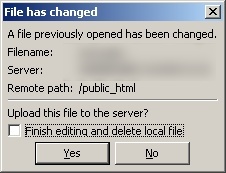
1\. When you "edit" a file and make and save any changes, FileZilla pop-ups a message saying "_A file previously opened has been changed - Upload this file to the server?_" - and sometimes it uploads the file anyway, even if you click "No". I'll prefer to upload my files when I'm ready thank-you-very-much, besides I save often to make sure I don't lose any data, not just when I'm done with the file. Here's the pop-up:
2. When trying to "edit" a file that you've recently edited, FileZilla doesn't always realize that you don't have the file open any more, so asks you "A file with that name is already being edited. Do you want to reopen ''?". This is fine and well... if I actually still had the file open, but in most cases I don't. As far as I'm concerned, this is a bug - and an annoying one at that. Here's the pop-up:
Considering I'll be using this program all day, every day, at work I refused to put up with these annoyances - why do people have to try and make their programs so smart, just make it do whatever it's meant to do, and make it do it well (and fast) so we'll all be happy - so some tinkering was in order. In both cases I simply removed the code that triggered those two events, and I've made a patch so you can do the same (at the bottom of this post).
For anyone who's interested, the offset that needed to be changed for the first pop-up was "00472C37" - the "CALL" needed to be changed to a "MOV EAX,2" so that there would be a valid "answer" from the pop-up for the rest of the code to evaluate. The second pop-up was as simple as just NOP'ing out the "CALL" at "004272E1".
Click to download my [FileZilla 3.2.3.1 Annoyances Fix patch](/downloads/FileZilla 3.2.3.1 Annoyances Fix patch.exe) 5.79kb (although some virus scanners might detect this patch as a virus, it's because of the program I made the patch in, there's no malicious code in the download file).